

Последняя версия
Update
September 20, 2026
September 20, 2026
Разработчик
OWL Automata P.C.
OWL Automata P.C.
Категории
Tools
Tools
Платформы
Android
Android
Загрузки
0
0
Лицензия
Бесплатно
Бесплатно
Имя пакета
com.owlautomata.app.sharknx
com.owlautomata.app.sharknx
Жалоба
Сообщить о проблеме
Сообщить о проблеме
More About SharKNX - KNX & ETS Toolkit
SharKNX is a professional mobile toolkit for KNX diagnostics, ETS project viewing, bus monitoring and commissioning, connecting directly to compatible KNX IP gateways with no server required.
Carry your ETS projects and KNX diagnostic and commissioning tools with you wherever you go, without needing to open a laptop for every service call.
#### ETS PROJECT VIEWER AND GROUP ADDRESS CONTROL
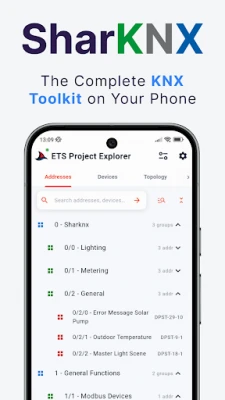
- Browse Group Addresses, KNX topology, building structure, functions and devices just as they are organized in your ETS project
- Inspect device communication objects (Group Objects) and linked Group Addresses
- Advanced filters for name, text, DPT, manufacturer, programming status and more
- Read and write Group Address values directly from the project
- Import secure ETS projects and automatically apply KNX Data Secure keys when sending and receiving telegrams
- Support for 100+ KNX Datapoint Types (DPTs) for correct decoding, display and control of Group Address values
- Trace KNX interconnections to see where devices send and receive data
#### KNX BUS MONITOR, GROUP MONITOR & DIAGNOSTICS
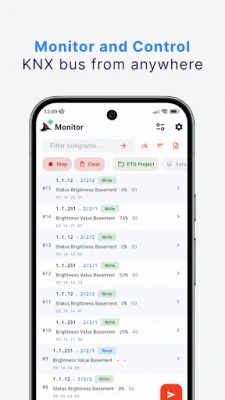
- Monitor live KNX telegrams in Bus Monitor or Group Monitor mode with detailed source, destination, Group Address and value information
- Advanced text filters, wildcards and AND/OR logic to isolate exactly the KNX traffic you need
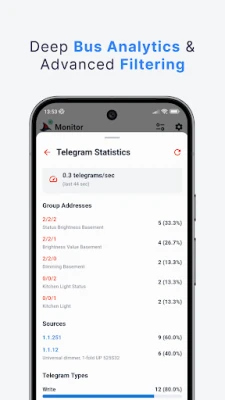
- Review bus statistics to investigate traffic, errors and communication problems
- Plot real-time values or see charts of devices generating traffic
- Import ETS XML monitor logs to review previous KNX bus captures
- Export telegrams to ETS XML or CSV for sharing, further analysis or importing back into ETS
#### COMMISSIONING AND DEVICE MANAGEMENT
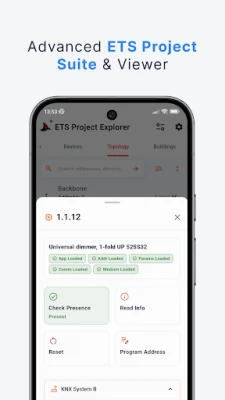
- Program KNX Individual Addresses and check whether devices exist on the bus
- Read filter tables from KNX line couplers and routers to compare the actual device configuration with your ETS project
- Scan KNX lines to discover devices to verify installations
- Scan for devices in Programming mode during commissioning
- Toggle Programming Mode and perform device reset
- Read Device Info with Group Communication to read Group Objects and their linked Group Addresses and test them on the spot
#### KNX IP SECURE AND DATA SECURE
- Connect directly to compatible KNX IP interfaces and routers using KNXnet/IP Tunneling over UDP or TCP
- Support KNX IP Secure Tunneling and KNX IP Secure Routing for encrypted communication over the IP network
- Support KNX Data Secure for encrypted Group Address communication using security data imported from ETS projects.
- Discover compatible KNX IP gateways automatically for faster connection and setup on site
- Work directly with KNX IP infrastructure with no separate visualization server
#### ASSISTANT, SCRIPTS AND CUSTOM WORKFLOWS
- Use the built-in Assistant to find project information and guide supported actions
- Reuse scripts for frequent diagnostic and commissioning work
- Create custom action pages for common commands, scenes and test routines
- Build practical control pages for lighting, climate and handover workflows
#### ETS PROJECT VIEWER AND GROUP ADDRESS CONTROL
- Browse Group Addresses, KNX topology, building structure, functions and devices just as they are organized in your ETS project
- Inspect device communication objects (Group Objects) and linked Group Addresses
- Advanced filters for name, text, DPT, manufacturer, programming status and more
- Read and write Group Address values directly from the project
- Import secure ETS projects and automatically apply KNX Data Secure keys when sending and receiving telegrams
- Support for 100+ KNX Datapoint Types (DPTs) for correct decoding, display and control of Group Address values
- Trace KNX interconnections to see where devices send and receive data
#### KNX BUS MONITOR, GROUP MONITOR & DIAGNOSTICS
- Monitor live KNX telegrams in Bus Monitor or Group Monitor mode with detailed source, destination, Group Address and value information
- Advanced text filters, wildcards and AND/OR logic to isolate exactly the KNX traffic you need
- Review bus statistics to investigate traffic, errors and communication problems
- Plot real-time values or see charts of devices generating traffic
- Import ETS XML monitor logs to review previous KNX bus captures
- Export telegrams to ETS XML or CSV for sharing, further analysis or importing back into ETS
#### COMMISSIONING AND DEVICE MANAGEMENT
- Program KNX Individual Addresses and check whether devices exist on the bus
- Read filter tables from KNX line couplers and routers to compare the actual device configuration with your ETS project
- Scan KNX lines to discover devices to verify installations
- Scan for devices in Programming mode during commissioning
- Toggle Programming Mode and perform device reset
- Read Device Info with Group Communication to read Group Objects and their linked Group Addresses and test them on the spot
#### KNX IP SECURE AND DATA SECURE
- Connect directly to compatible KNX IP interfaces and routers using KNXnet/IP Tunneling over UDP or TCP
- Support KNX IP Secure Tunneling and KNX IP Secure Routing for encrypted communication over the IP network
- Support KNX Data Secure for encrypted Group Address communication using security data imported from ETS projects.
- Discover compatible KNX IP gateways automatically for faster connection and setup on site
- Work directly with KNX IP infrastructure with no separate visualization server
#### ASSISTANT, SCRIPTS AND CUSTOM WORKFLOWS
- Use the built-in Assistant to find project information and guide supported actions
- Reuse scripts for frequent diagnostic and commissioning work
- Create custom action pages for common commands, scenes and test routines
- Build practical control pages for lighting, climate and handover workflows
Оцените приложение
Добавить комментарий и отзыв
Отзывы пользователей
Based on 0 reviews
Отзывы пока не добавлены.
Комментарии не будут одобрены к публикации, если они являются СПАМОМ, оскорбительными, не по теме, содержат ненормативную лексику, содержат личные атаки или пропагандируют ненависть любого рода.














Еще »

Популярное

OTP Bank HUOTP Bank Nyrt.

Santander mobileSantander Bank Polska S.A.

ABN AMRO CreditcardInternational Card Services BV

Блазар VPN - Бесплатный ProxyDeveem LLC

5 ночей с Тимохой 5: ОСТРОВTIM GZ

Пуля VPNVPN Pulya

Академия УлыбокKnomary Ltd.

Террикон.ДневникЭлЖур

HitrayHitVPN

Basketball Legacy Manager 25Hockey Legacy Manager